
chart.flowchart
Flowchart chart
Typed process nodes with labelled decisions, explicit ports, arrows, merges, and loop routing.
- Exact variations
- 1
- Surfaces
- 2
Explore the generated output
Choose a real-world variation and surface. The preview and interactive state come directly from the certified skill output; the website does not redraw or alter the chart.
Request handling
4 process nodes and 4 typed edges across 1 components; 1 strongly connected cycle groups.
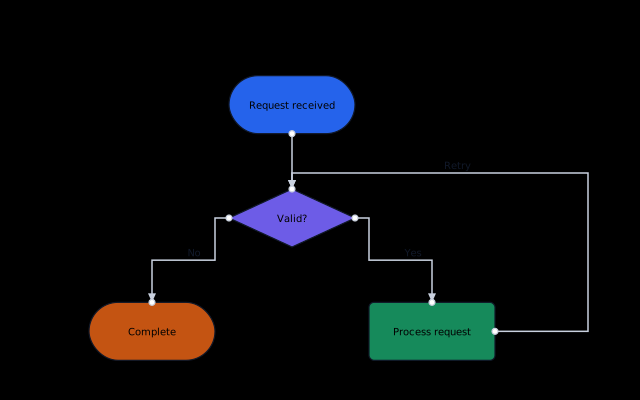
4 process nodes and 4 typed edges across 1 components; 1 strongly connected cycle groups.
Static chart preview shown.
Inspect before you invoke
Ask Squillify for the live, versioned contract before constructing an input. That keeps your agent aligned with the chart-specific schema, limits, supported behavior, and recovery guidance.
GET /v1/runtime/skills/chart.flowchart/contractDesigned defaults, precise customization
Theme, surface, and density
Start from the Neutral baseline or choose one of nine additional predefined style foundations. Each coordinates color, typography, spacing, and chart chrome.
Palettes and semantic tokens
Apply approved categorical, sequential, or diverging paint while retaining stable data identity and meaning.
Typed, scoped rules
Target supported chart roles, series, categories, points, or meanings with validated paint, shape, and emphasis controls.
Bounded paint-only CSS
Use sanitized, chart-scoped CSS for final decoration without changing layout, measurement, data, or grammar.